名前
ST_Clip — 入力ジオメトリーで切り取ったラスターを返します。バンドが指定されていない場合には、全てのバンドが処理されます。crop が指定されていなかったり TRUE となっている場合には、出力ラスターは切り取られます。touched が TRUE の場合には、接触するピクセルは取り込まれ、TRUE でない場合には、中心がジオメトリー内にあるピクセルだけが取り込まれます。
概要
raster ST_Clip(raster rast, integer[] nband, geometry geom, double precision[] nodataval=NULL, boolean crop=TRUE, boolean touched=FALSE);
raster ST_Clip(raster rast, integer nband, geometry geom, double precision nodataval, boolean crop=TRUE, boolean touched=FALSE);
raster ST_Clip(raster rast, integer nband, geometry geom, boolean crop, boolean touched=FALSE);
raster ST_Clip(raster rast, geometry geom, double precision[] nodataval=NULL, boolean crop=TRUE, boolean touched=FALSE);
raster ST_Clip(raster rast, geometry geom, double precision nodataval, boolean crop=TRUE, boolean touched=FALSE);
raster ST_Clip(raster rast, geometry geom, boolean crop, boolean touched=FALSE);
説明
入力ジオメトリー geom で切り取ったラスターを返します。バンドが指定されていない場合には、全てのバンドが処理されます。
ST_Clip が返すラスターは、バンド毎に一つずつ必ず切り取った領域に適用する NODATA 値を持ちます。NODATA 値が渡されず、入力ラスターが NODATA 値を持たない場合には、結果ラスターの NODATA 値は ST_MinPossibleValue(ST_BandPixelType(rast, band)) に設定されます。配列における NODATA 値の要素数がバンド数より小さい場合には、配列の最後の要素が残りのバンドに適用されます。NODATA 値の要素数がバンド数より多い場合には、超過分は無視されます。全ての NODATA 値配列を受け付ける形式では、バンド毎に適用される単一値も受け付けます。
crop が指定されていない場合には、TRUE として扱われ、出力ラスターは geom と rast の範囲の共有領域で切り取ります。crop が FALSE に指定されている場合には、新しいラスターは rast と同じ範囲になります。touched が TRUE に指定されている場合には、ジオメトリーとインターセクトする rast 内の全てのピクセルが選択されます。
![[注記]](../images/note.png)
|
|
|
デフォルトの振舞いは touched=false で、中心がジオメトリーに含まれているピクセルを選択するだけです。 |
Enhanced: 3.5.0 - 引数 touched を追加。
Availability: 2.0.0
Enhanced: 2.1.0 C 言語で記述されました
ここの例では、MassGIS サイト上の MassGIS Aerial Orthos にあるマサチューセッツ空中写真データを使っています。
例
touched を TRUE にした場合 (all touched) と、そうしなかった場合 (default clip) との比較。
WITH source AS (
    SELECT rast, geom
    FROM ST_AsRaster(ST_Letters('R'), scalex =
> 1.0, scaley =
> -1.0) AS r(rast)
    INNER JOIN ST_GeomFromText('LINESTRING(0 1,5 6,10 10)') AS g(geom)
        ON ST_Intersects(r.rast, g.geom)
), clipped AS (
    SELECT rast,
        ST_Clip(rast, geom, touched =
> true) AS rast_touched,
        ST_Clip(rast, geom, touched =
> false) AS rast_not_touched
    FROM source
), variants AS (
    SELECT 'original' AS title, ST_Count(rast) AS pixel_count, rast AS rendered
    FROM clipped
    UNION ALL
    SELECT 'all touched', ST_Count(rast_touched), rast_touched
    FROM clipped
    UNION ALL
    SELECT 'default clip', ST_Count(rast_not_touched), rast_not_touched
    FROM clipped
)
SELECT title, pixel_count, ST_AsPNG(rendered) AS image
FROM variants
ORDER BY CASE title
    WHEN 'original' THEN 1
    WHEN 'all touched' THEN 2
    ELSE 3
END;
title        | pixel_count | image
--------------+-------------+----------------------------
 original     |        2605 | PNG image, 48 x 74 pixels
 all touched  |          16 | PNG image, 11 x 11 pixels
 default clip |          10 | PNG image, 11 x 11 pixels
(3 rows)
次の自己完結の例では、三つの単純形状を RGB の 3バンドとして使います。1番バンドを矩形に切り詰める例、1番バンドを切詰め無しで切り抜きを行って 2番バンドと 3番バンドを保存する例、全バンドを矩形切詰め無しで切り抜きを行う例です。
WITH canvas AS (
    SELECT ST_AddBand(
        ST_AddBand(
            ST_AddBand(
                ST_MakeEmptyRaster(128, 128, 0, 128, 1, -1, 0, 0, 0),
                '8BUI'::text, 0::double precision, 0::double precision
            ),
            '8BUI'::text, 0::double precision, 0::double precision
        ),
        '8BUI'::text, 0::double precision, 0::double precision
    ) AS rast
), source AS (
    SELECT ST_SetValue(
        ST_SetValue(
            ST_SetValue(rast, 1, ST_Buffer('POINT(32 96)'::geometry, 22), 220),
            2, ST_Buffer('LINESTRING(18 20,110 110)'::geometry, 6,
                         'endcap=flat join=bevel'), 210
        ),
        3, ST_Buffer('LINESTRING(10 48,118 48)'::geometry, 7,
                     'endcap=flat'), 180
    ) AS rast,
    ST_Buffer('POINT(64 64)'::geometry, 34) AS clipper
    FROM canvas
), variants AS (
    SELECT 'original RGB' AS title, rast AS rendered FROM source
    UNION ALL
    SELECT 'band 1 cropped', ST_Clip(rast, 1, clipper, true) FROM source
    UNION ALL
    SELECT
        'band 1 only',
        ST_AddBand(
            ST_Clip(rast, 1, clipper, false),
            ARRAY[ST_Band(rast, 2), ST_Band(rast, 3)]
        )
    FROM source
    UNION ALL
    SELECT 'all bands clipped', ST_Clip(rast, clipper, false) FROM source
)
SELECT title, ST_AsPNG(rendered) AS image
FROM variants
ORDER BY CASE title
    WHEN 'original RGB' THEN 1
    WHEN 'band 1 cropped' THEN 2
    WHEN 'band 1 only' THEN 3
    ELSE 4
END;
title             | image
-------------------+-----------------------------
 original RGB      | PNG image, 128 x 128 pixels
 band 1 cropped    | PNG image, 68 x 68 pixels
 band 1 only       | PNG image, 128 x 128 pixels
 all bands clipped | PNG image, 128 x 128 pixels
(4 rows)
矩形切詰め、単一バンドの切抜き、全バンドの切抜き。
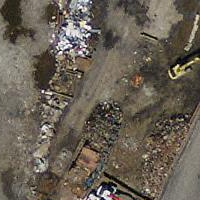
元のタイル |
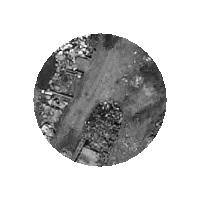
矩形切詰め |
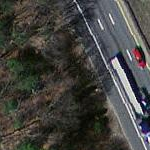
1バンド切抜きの元データ |
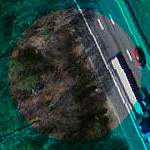
1バンド切抜き |
|
全バンド切抜きの元データ |
全バンド切抜き |